Call Tracking for PPC Campaigns
PPC campaigns do not end at the click. For many local, service-based, and high-intent businesses, the real conversion happens when a prospect picks up the phone. That is why call tracking matters: it helps connect paid clicks to actual phone conversations, instead of leaving marketers to judge campaign quality by form fills or CTR alone. Google Ads supports multiple phone-call conversion types, including calls from ads and calls from a website, and its call reporting system can capture call duration, start time, connection status, and other useful call details.
That matters even more now because Google is actively retiring the old call-ad workflow. Google’s help documentation says that starting in February 2026, advertisers can no longer create new call ads, and that existing call ads will stop receiving impressions in February 2027. The replacement is responsive search ads with call assets, which means any PPC article on call tracking should now reflect that updated setup.
Quick Answer
Call tracking for PPC campaigns works by assigning trackable phone numbers to ads, landing pages, or sessions so you can see which keywords, campaigns, ads, and sources actually drive calls. In Google Ads, native call reporting uses Google forwarding numbers to measure calls from ads and call assets. Third-party platforms add another layer by using features like dynamic number insertion, attribution rules, call recording, routing, AI summaries, and offline conversion syncing.
Google Ads Call Tracking vs Third-Party Call Tracking
The simplest way to think about PPC call tracking is this: Google’s native tools are enough to track many ad-driven phone calls, but they are not always enough to understand the full customer journey. Native Google Ads call reporting is built around calls from ads, call assets, and Google forwarding numbers. Third-party call tracking platforms are better when you need landing-page attribution, keyword-level visibility across sessions, call routing, call recordings, lead qualification, or integrations with CRM and offline conversion workflows.
| Approach | Best For | Main Limitation |
| Google Ads native call reporting | Tracking calls from ads and call assets | Less flexible for full-funnel attribution |
| Website call conversions in Google Ads | Tracking calls after ad clicks reach your site | Still narrower than dedicated call tracking platforms |
| Third-party call tracking software | Attribution, routing, recordings, lead quality, reporting | Usually adds cost and setup complexity |
This comparison follows Google Ads help documentation on call reporting and phone call conversions, along with current call tracking vendor documentation that explains how campaign-level and session-level call attribution works.
How Call Tracking for PPC Actually Works
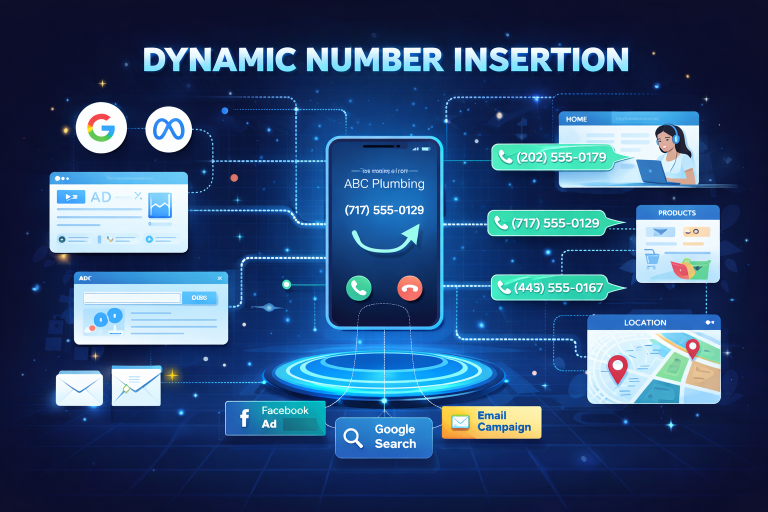
For landing-page-based PPC campaigns, call tracking usually relies on dynamic number insertion, often shortened to DNI. In that setup, the number shown on the page changes based on the visitor’s source or session, so the system can connect the eventual phone call back to the campaign, keyword, or click path that brought the user in. CallRail’s current guide explains call tracking in those terms, and its getting-started documentation still centers setup around assigning tracking numbers and installing a JavaScript snippet.
For ad-driven calls that happen directly from the ad, Google’s own system can handle much of the tracking through call reporting and call assets. Google says call reporting can show details such as call duration, start and end time, connection status, call type, and caller area code, which makes it useful for more than just counting calls. It can also help advertisers define call conversions based on duration and use that data inside automated bidding.
Where PPC teams usually get more value is when they stop treating every phone call as equal. Google supports importing phone call conversions and offline conversions, which allows advertisers to tie downstream outcomes back to ad clicks or calls. In practice, that means you can push back only the calls that meet your quality threshold, instead of teaching Google to optimize for every dial attempt.
“Accurate conversion tracking is foundational. Without reliable data, setting targets like tROAS or tCPA becomes guesswork.”
— John Moran, performance marketer and educator
That principle is exactly why call tracking improves PPC performance. It gives bidding systems better signals, gives marketers better reporting, and gives clients a clearer picture of which campaigns drive real conversations instead of vanity metrics.
What You Should Track in PPC Call Tracking
The most useful PPC call tracking setups usually monitor more than call count. Google’s call reporting documentation highlights details like call duration, whether the call connected, start and end time, and caller area code. Those fields help you move from simple volume reporting toward actual lead-quality analysis.
| Metric | Why It Matters |
| Call duration | Helps separate short misdials from stronger leads |
| Call status | Shows whether calls were missed, received, or connected |
| Campaign / keyword source | Helps shift budget toward revenue-driving queries |
| Time of call | Helps optimize ad scheduling and staffing |
| Qualified vs unqualified outcome | Helps train bidding toward better leads, not just more calls |
This is also where a third-party platform often becomes more useful than native reporting alone. If your business needs call recordings, AI summaries, routing, lead scoring, CRM sync, or multi-touch reporting, a dedicated platform will usually give you more context than Google Ads by itself.
“Track only revenue-driving actions — calls, qualified forms, bookings, purchases. Everything else is secondary.”
— Stephen Whitten, digital strategist
That advice fits PPC call tracking perfectly. If you optimize for every call, you risk teaching Google to chase low-value activity. If you optimize for qualified calls, booked appointments, or real sales conversations, your campaign data becomes much more useful.
Best Practices for Call Tracking in PPC Campaigns
Start with the right conversion definition. For some advertisers, that may mean counting calls longer than a specific duration. For others, it may mean importing only calls that turned into booked jobs, admissions, consultations, or sales. Google’s own call reporting documentation explicitly supports counting calls of a specified duration as conversions, and its offline conversion tools support pushing downstream outcomes back into Google Ads.
Use native Google Ads call reporting even if you also use third-party software. Google’s forwarding-number system is still the official source for ad-level call reporting in Google Ads, and combining it with an external platform often gives you both bidding visibility and richer operational context.
Do not leave this data in a silo. The value of call tracking grows when it feeds campaign optimization, staffing decisions, keyword prioritization, landing-page testing, and CRM reporting. That is why platforms in this space increasingly emphasize attribution plus workflow, not just call logs.
Tools Commonly Used for PPC Call Tracking
For most advertisers, the common shortlist includes CallRail, CallTrackingMetrics, WhatConverts, and Invoca. CallRail’s current positioning centers on lead engagement and attribution, CallTrackingMetrics emphasizes communications intelligence and Google Ads integration, WhatConverts leans heavily into lead tracking and reporting, and Invoca positions itself around conversation intelligence and marketing optimization.
FAQ
What is call tracking in PPC?
Call tracking in PPC is the process of connecting paid clicks and campaigns to phone calls, so advertisers can see which keywords, ads, and landing pages actually generate phone leads. Google Ads supports call reporting and phone call conversions, while dedicated software can add more attribution depth and lead-quality analysis.
Does Google Ads track phone calls?
Yes. Google Ads supports phone call conversion tracking, call reporting, and imported phone call conversions. Google’s help pages also explain that call reporting works through Google forwarding numbers.
Do I still need third-party call tracking if I use Google Ads?
Often, yes. Google Ads can track calls from ads and from website interactions, but third-party platforms are better when you need dynamic number insertion, call recordings, routing, CRM integration, or broader attribution reporting.
What replaced call-only ads in Google Ads?
Google says call ads are being phased out and replaced by responsive search ads with call assets. New call ads could no longer be created starting in February 2026, and existing call ads are scheduled to stop receiving impressions in February 2027.